
Product Overview
EagleEye DLP is an endpoint security software aimed at preventing enterprise data leakage by actively monitoring and controlling sensitive data access.
My Role
UI & UX Designer
User Research, Interaction, Visual design, Prototyping & Testing
Product Users
Enterprise Cyber Security Operator
August 2020 - March 2022
Background
EagleEye DLP is an internal data security tool developed to prevent sensitive data leakage. When the company decided to turn it into a commercial product for other enterprise clients, we realized the original interface was designed for internal expert and it was too complex and outdated for a broader user base. A complete redesign was needed to make it easier to use, more visually consistent, and ready for the market.
I worked alongside a senior design lead and a cross-functional team of 20+ engineers and product managers to redesign the product’s user experience and interface. And the key achievements is listed below:
User Research: Conducted in person interviews and usability analysis with internal security staff to understand workflow pain points and uncover opportunities for simplification and improvement.
Flow Optimization: Redesigned the workflow of a core feature to reduce cognitive load and repetitive steps, helping users complete tasks faster and making onboarding smoother.
Visual Design Upgrades: Modernized the interface with a cleaner layout, updated typography, and improved visual hierarchy to enhance readability, consistency
This case study focuses on optimizing the policy issuance workflow.
Research
Our design process began with user research to uncover pain points and understand where the experience was falling short. I conducted in-person interviews with 10 users and synthesized the findings through qualitative and quantitative Analysis

In addition to interviews, I conducted contextual observation sessions with 10 users as they managed policy tasks throughout the week. This led to the following key insights:
40mins
Issuing a policy for a single department
28%
issued policies were found to be in conflict with existing ones
Problem Statement
Unclear priority rules lead to policy conflicts, causing some policies to fail without warning.
The manual process of applying DLP policies to user groups is slow, error prone, and frustrating.
Existing Framework
To better understand how the existing features were structured, I created a framework to map out the current system and illustrate how policy conflicts occur.

Coming Up with Potential Solutions
We worked closely with the product manager and backend engineers to restructure the policy logic. Employees were first grouped by their departments, forming the base of the policy structure.
However, through user research, we discovered that many employees frequently collaborated across departments on different projects. To address this complexity, we introduced Exception Rules to handle special operational scenarios. These were then integrated into a new system called Aggregated Policy, allowing multiple rules to be combined and prioritized more effectively.
We went through multiple rounds of iteration with PMs and engineers to refine the solution, ensuring it was both technically feasible and aligned with everyday usage scenarios.
Solution Framework
We defined a clear rule hierarchy to reduce conflicts and improve clarity: Exception Rules override Default Rules Operational Scenarios take precedence over Department-based rules

Wireframe
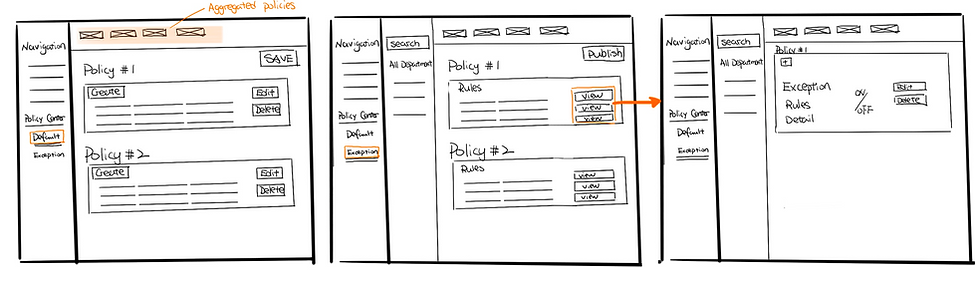
To reduce policy conflicts and streamline the issuance process, I designed a set of wireframes addressing the core problems identified earlier:
-
Unclear priority rules causing silent failures
-
A manual and error prone policy assignment workflow
Prototype
Aggregated Policy View
Users can now view all active rules affecting a group or individual in a consolidated view. This helps prevent redundancy and makes debugging easier.

Exception Rule Module
A dedicated module for defining Exception Rules based on real life operational needs. Users can assign temporary or scenario specific policies without interfering with default department rules.
Exception Rule Module
A dedicated module for defining Exception Rules based on real-life operational needs. Users can assign temporary or scenario-specific policies without interfering with default department rules.

Configuring Exception Policies
We defined a clear rule hierarchy to reduce conflicts and improve clarity:
-
Exception Rules override Default Rules
-
Operational Scenarios take precedence over Department-based rules

Outcome
-
We cleared up the confusing policy conflicts by setting up a clear hierarchy, which made the system more reliable and users more confident.
-
The new exception rules made it easier for teams working across departments to manage policies more accurately.
-
Internal users and stakeholders have given really positive feedback, showing the design truly helped solve the real problems.
Improved Efficiency
8 mins
Issue policy
The time required to edit a departmental policy decreased from 40 minutes to just 8 minutes.
0%
Policy Conflicts
We eliminated conflicting policies by introducing a clear rule hierarchy.
User Interface Design Upgrade
The original software was built by engineers with inconsistent colors, styles, and interaction patterns across different features. We upgraded the UI into a cohesive product with a unified brand identity.

